
WhatsApp Business API Explained: How Indian Companies Are Automating Customer Communication
Learn how the WhatsApp Business API works and how Indian companies use it for order confirmations, shipping updates, appointment reminders, support automation, and more.
VidyaSaaS Team
Super Administrator
Introduction
You know the WhatsApp Business App. You might even be using it right now to talk to customers. It's free, it's easy, and it works well for small operations.
But here's the thing. The Business App was never designed to handle what growing businesses actually need. It doesn't support team collaboration. It can't integrate with your CRM. It can't send automated order confirmations. It doesn't scale.
That's where the WhatsApp Business API comes in. For a deeper dive, see WhatsApp Business marketing.
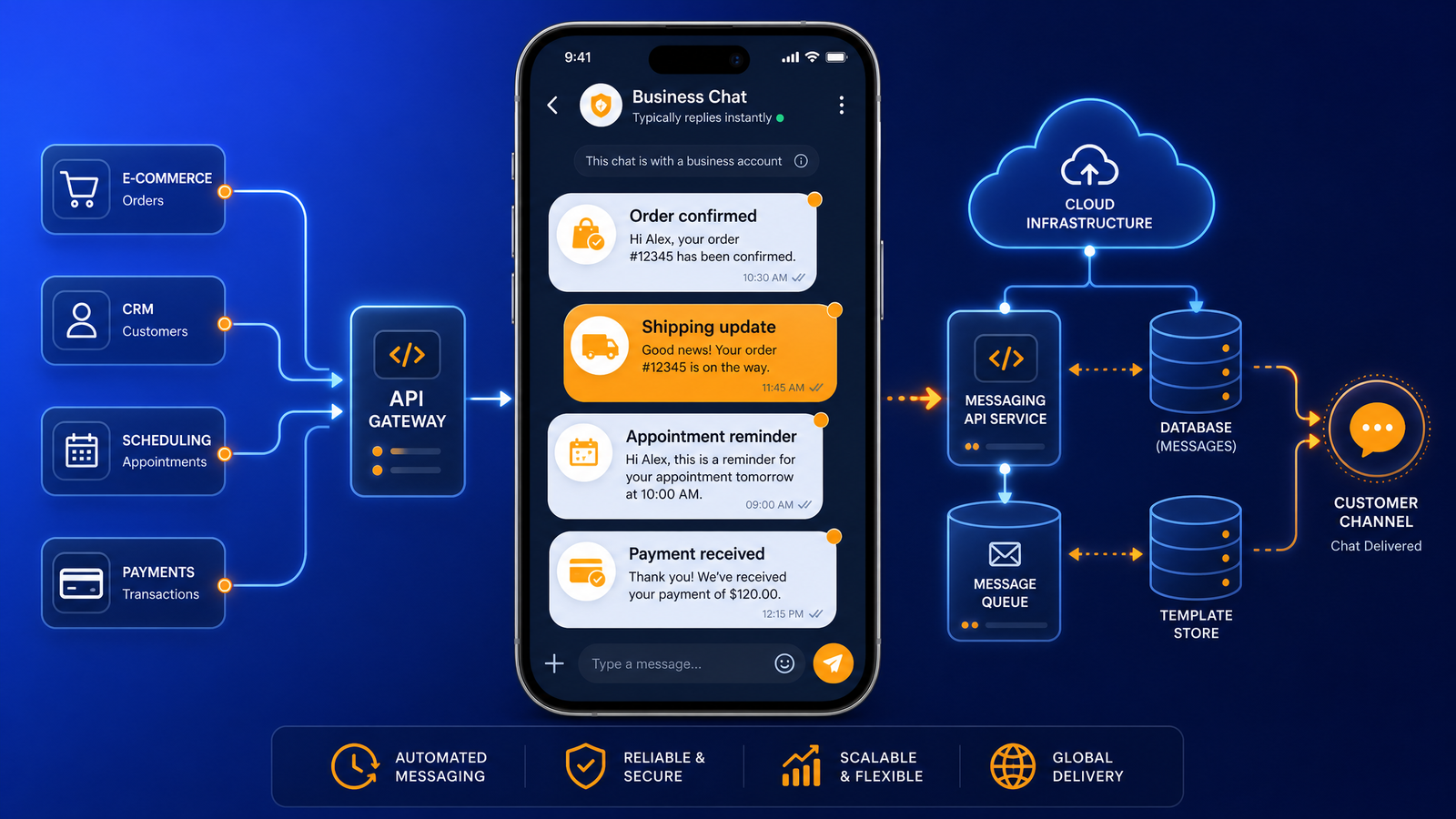
The API is WhatsApp's enterprise solution — a tool that connects WhatsApp directly to your business systems. It lets you send automated confirmations when someone orders. It lets your entire support team handle conversations from one platform. It lets you broadcast to thousands of customers (who have opted in) with a single click.
And Indian companies are adopting it fast. From e-commerce giants to local clinics, businesses across India are discovering that the API turns WhatsApp from a chat app into a full-fledged business communication platform.
This guide explains everything you need to know about the WhatsApp Business API — how it works, what it costs, how to set it up, and how Indian businesses are using it to automate customer communication.
WhatsApp Business App vs Business API: The Real Difference
Let's start by being very clear about what separates these two products.
WhatsApp Business App
What it is: A free mobile app for Android and iOS. Download from the Play Store or App Store and you're up and running in 10 minutes.
Who it's for: Solo entrepreneurs, small retailers, freelancers, and businesses handling fewer than 50-100 conversations per day.
What it can do:
- Business profile with description, hours, and address
- Quick replies for common questions
- Labels to organize chats
- Away messages and greeting automation
- Product catalog (up to 500 items)
- Broadcast lists (256 contacts per list)
- Basic messaging stats
What it can't do:
- Multiple agents using the same number simultaneously
- CRM or backend integration
- Automated messaging triggered by external events
- Large-scale broadcasting
- Chatbot functionality beyond basic auto-replies
WhatsApp Business API
What it is: A paid cloud-based platform that connects WhatsApp to your business software through a Business Solution Provider (BSP).
Who it's for: Growing businesses, teams, e-commerce brands, real estate developers, service companies handling 100+ conversations daily.
What it can do:
- Multiple agents handling conversations from one number
- CRM integration (HubSpot, Zoho, Salesforce, custom)
- Automated notifications (order confirmations, shipping updates, payment reminders)
- Chatbots for first-level support
- Broadcast to thousands of opted-in customers
- Message templates pre-approved by WhatsApp
- Detailed analytics on conversation metrics
Key limitations:
- Costs money (platform fees + per-conversation charges)
- Takes 1-4 weeks to get full approval from WhatsApp
- Requires technical setup or a partner to implement
Which One Should You Use?
Here's a simple decision framework:
Use the Business App if:
- You're a one-person business
- You handle 0-50 conversations per day
- You don't need team access
- You don't have a CRM or backend
- You want to test WhatsApp marketing before investing
Start considering the API if:
- You handle 50-100 conversations per day (and growing)
- You have multiple people handling customer communication
- You want to automate order updates or appointment reminders
- You use a CRM that should be connected to WhatsApp
- You want to run WhatsApp campaigns at scale
How the WhatsApp Business API Actually Works
Understanding how the API works will help you make better decisions about implementation and costs.
The Basic Architecture
WhatsApp → BSP (Business Solution Provider) → Your Business Systems
You don't connect directly to WhatsApp. You work through a BSP — a company that WhatsApp has approved to resell API access.
The flow looks like this:
- A customer sends a message to your WhatsApp number
- WhatsApp routes it to your BSP's platform
- The BSP's platform shows it in your dashboard (or forwards it to your CRM)
- Your agent or chatbot replies through the BSP
- The BSP sends the reply back through WhatsApp to the customer
Types of Conversations
The API uses a conversation-based pricing model. Understanding conversation types is critical for cost management.
User-Initiated Conversations: The customer messages you first. You have 24 hours to reply within the same conversation window. These are cheaper.
Business-Initiated Conversations: You message a customer first using a pre-approved template. This starts a new conversation. These are more expensive.
Service Conversations: Conversations where you're providing customer support within the 24-hour window. Charged at the user-initiated rate.
Utility Conversations: Confirmation messages, order updates, account notifications. These have their own pricing category, usually cheaper than marketing messages.
Authentication Conversations: One-time passwords and verification codes. Separate pricing.
The 24-Hour Rule Explained
When a customer messages you, WhatsApp opens a 24-hour conversation window. Within those 24 hours, you can send any messages you want — no template required, no restrictions.
After 24 hours, the window closes. To send a new message, you must:
- Use a pre-approved message template
- Wait for WhatsApp's approval (typically 24-48 hours for template review)
- Pay for a new business-initiated conversation
This rule is the single most important thing to understand about API pricing. It determines how you structure your automation and how much you'll pay.
Use Case 1: Order Confirmations and Shipping Updates
This is where the API delivers the most immediate value. E-commerce businesses can automate their entire order communication flow.
The Automation Flow
- Customer places an order on your website
- Your backend sends order data to your BSP via API
- BSP sends a WhatsApp template message: "Hi [name], your order #[order ID] is confirmed. Estimated delivery: [date]. Track here: [link]"
- When the order ships, another automated message: "Your order #[order ID] has shipped! Track: [link]"
- After delivery: "Your package has been delivered! Enjoy your [product]. Share feedback: [link]"
Real Indian Example
A D2C fashion brand in Jaipur implemented this. Before the API, they were sending order confirmations via SMS (₹0.50 per message) and handling "Where's my order?" queries manually (3 support staff, full-time).
After API implementation:
- Automated WhatsApp confirmations replaced SMS
- "Where's my order?" queries dropped by 70% because customers could see tracking in the chat
- One support staff was redeployed to sales
- Customer satisfaction scores went up 22%
The cost per WhatsApp conversation was ₹0.40 — cheaper than their SMS costs — plus saved salary costs.
Use Case 2: Appointment Reminders and Booking Confirmations
Service businesses — clinics, salons, coaching centers, auto repair shops — deal with massive no-show problems. WhatsApp API appointment reminders slash no-show rates.
The Automation Flow
- Customer books an appointment on your website or call
- Your booking system triggers a WhatsApp confirmation
- 24 hours before the appointment, an automated reminder: "Hi [name], this is a reminder about your appointment tomorrow at [time]. Location: [address]. Confirm or reschedule: [link]"
- 2 hours before the appointment, a final reminder
- After the appointment, a follow-up: "Thanks for visiting! How was your experience? Rate us: [link]"
Real Indian Example
A chain of dental clinics in Bangalore implemented WhatsApp API reminders. Their no-show rate was 22% — meaning nearly 1 in 4 booked appointments were wasted.
After implementing automated reminders:
- No-show rate dropped to 8%
- Revenue increased by 15% without adding a single new patient
- Staff spent less time calling to confirm appointments
- Patients appreciated the convenience of confirming via WhatsApp
The entire system — BSP platform + conversation charges — cost ₹8,000/month across 4 clinics. The recovered appointment revenue was over ₹1.2 lakhs/month.
Use Case 3: Customer Support Automation
WhatsApp has become the preferred support channel for Indian customers. But support volume can overwhelm small teams. The API solves this with chatbots.
The Automation Flow
Level 1 — Chatbot handles:
- Order status inquiries
- Return and exchange policy questions
- Business hours and location
- Frequently asked questions
- Product availability checks
Level 2 — Human agent handles:
- Complaint resolution
- Escalated issues
- Complex queries that the chatbot can't answer
- Sales inquiries that need human touch
Level 3 — Manager handles:
- Critical issues
- Refund approvals
- Relationship recovery
Setting Up a WhatsApp Support Bot
Start simple. Don't try to automate your entire support workflow on day one.
Step 1: Export your last 500 support conversations. Step 2: Categorize them. What are the top 5 questions people ask? Step 3: Build a simple decision tree for those 5 questions. Step 4: Set up the chatbot to handle those 5 query types. Step 5: For everything else, pass to a human. Step 6: Monitor weekly. What new questions are people asking? Add them.
Within 4 weeks, most businesses find their chatbot handles 40-60% of all incoming queries without human intervention.
Real Indian Example
A mid-sized electronics retailer in Mumbai was handling 300+ WhatsApp queries per day. Most were "What's the price?" and "Is this in stock?" — repetitive questions that didn't need human responses.
They implemented a simple chatbot that:
- Recognized product model numbers from customer messages
- Automatically replied with price and stock status
- Directed store-location questions to a map link
- Escalated only complex queries to human staff
Result: 55% of all queries handled by the bot. Human support team reduced from 6 to 3 people. Average response time dropped from 45 minutes to under 30 seconds for bot-handled queries.
Use Case 4: Payment Reminders and Follow-ups
For businesses that deal with installment payments, pending invoices, or subscription renewals, WhatsApp payment reminders are remarkably effective.
The Automation Flow
- Customer has a payment due in 7 days
- Automated WhatsApp reminder: "Hi [name], your EMI of ₹[amount] is due on [date]. Pay now: [payment link]"
- Day of due date: Final reminder with payment link
- One day after missed payment: Gentle follow-up
- Three days after: Escalation — "Let us know if you need assistance with payment"
Why WhatsApp Beats Email for Payment Reminders
Payment reminders via email get opened by maybe 20-30% of recipients. Payment reminders via WhatsApp get opened by 90%+. More importantly, they get acted on faster. The payment link is right there in the chat. No logging in to email, no searching for the invoice, no typing in URLs.
A real estate developer in Pune used WhatsApp API payment reminders for their EMI collection. In the first quarter:
- On-time payment rate increased from 65% to 82%
- Late payment resolution time dropped by 60%
- Support calls about "When is my payment due?" dropped to near zero
Use Case 5: Large-Scale Broadcasts and Campaigns
The Business App limits broadcasts to 256 contacts. The API can broadcast to hundreds of thousands — within WhatsApp's policy framework.
How Broadcasts Work in the API
Unlike the Business App, API broadcasts require:
- A pre-approved message template
- Recipients who have opted in to receive messages from you
- Compliance with WhatsApp's messaging limits (based on account quality)
Broadcast Strategy
Don't blast your entire list with the same message. Segment first.
Segment by behavior:
- Customers who bought in the last 30 days → New arrivals
- Customers who bought 3-6 months ago → Re-engagement offers
- Customers who browsed but didn't buy → Product recommendations
Segment by demographics:
- City-specific offers
- Age-specific content
- Gender-specific products
Segment by engagement:
- High-engagement subscribers → More frequent, richer content
- Low-engagement subscribers → Less frequent, value-focused content
Broadcast Best Practices
- Never more than 2-4 broadcasts per month per segment
- Always include value in every broadcast (not just sales pitches)
- Track opt-out rates after each broadcast
- If opt-out rate exceeds 2%, adjust your frequency or content
Setup Process: From Zero to API
Getting the WhatsApp Business API up and running involves several steps. Here's the process.
Step 1: Choose a Business Solution Provider (BSP)
The BSP is your gateway to the API. You cannot access the API directly — you must go through a BSP.
Popular BSPs in India:
- Interakt — Indian BSP, good support, built for Indian businesses
- WATI — Good for small-medium businesses, easy setup
- Twilio — Global leader, flexible but requires more technical setup
- MessageBird — Good for international businesses
- Gupshup — Strong presence in India, good for enterprise
Selection criteria:
- Indian support and local presence
- Pricing transparency (per conversation vs per seat vs fixed monthly)
- Integration capabilities with your existing tools
- Ease of use (do you need a developer or can your marketing team manage it?)
- Template approval support
Step 2: Apply for WhatsApp Business Account
Your BSP will guide you through this. You'll need:
- Your business details (name, address, registration number)
- Your business phone number (must not be registered with the WhatsApp Business App or personal WhatsApp)
- Verification documents (GST, business registration, etc.)
Step 3: Set Up Your WABA (WhatsApp Business Account)
Once approved, you configure:
- Business profile (display name, description, website, address)
- Business category
- Opt-in methods
- Message quality settings
Step 4: Create and Submit Message Templates
All business-initiated messages require WhatsApp-approved templates. Common templates include:
- Order confirmation
- Shipping update
- Appointment reminder
- Payment confirmation
- Welcome message
Templates take 24-48 hours for approval. Have your templates ready before you need them.
Step 5: Integrate with Your Systems
Connect the API to:
- Your CRM (for lead tracking and customer history)
- Your e-commerce platform (for order-based triggers)
- Your booking system (for appointment automation)
- Your support system (for ticket management)
Step 6: Test and Launch
Start with a small test group. Verify that messages are sending correctly, tracking is working, and the conversational flow is smooth. Then scale gradually.
The entire setup typically takes 2-4 weeks from start to launch.
Cost Structure of WhatsApp Business API
Let's talk money. How much does the API actually cost?
Components of Cost
BSP Platform Fee:
- Range: ₹2,000 - ₹20,000/month depending on features
- Some BSPs charge per seat (agent), others charge flat monthly
- Watch for hidden features — chatbot builders, analytics dashboards, and integrations might be upsells
Conversation Charges (WhatsApp): These are WhatsApp's fees, passed through by the BSP.
For Indian numbers (as of 2025-2026):
- User-initiated conversations: ₹0.30 - ₹0.40 per conversation
- Business-initiated (marketing templates): ₹0.50 - ₹0.65 per conversation
- Utility conversations: ₹0.25 - ₹0.35 per conversation
- Authentication conversations: ₹0.20 - ₹0.30 per conversation
Note: A "conversation" is a 24-hour window of back-and-forth, not a single message.
Additional Costs:
- WhatsApp display name verification (one-time, ₹0 - ₹5,000)
- Two-factor authentication setup
- Premium features from your BSP (advanced analytics, AI chatbots, etc.)
Sample Monthly Cost Estimate
For a business handling 2,000 conversations per month (mix of customer-initiated and business-initiated):
| Cost Item | Amount | |-----------|--------| | BSP platform fee (basic) | ₹3,000 | | 1,500 user-initiated conv. (₹0.35 each) | ₹525 | | 500 business-initiated conv. (₹0.55 each) | ₹275 | | Total monthly | ₹3,800 |
Compare that to the value. If those conversations lead to even 10 sales of ₹3,000 each (₹30,000 revenue), the cost is negligible.
Integration with CRM: The Real Power Move
Connecting WhatsApp API to your CRM is where the magic happens. Everything clicks together.
What Integration Lets You Do
- Every WhatsApp conversation with a lead is automatically logged in your CRM
- Your sales team sees the full conversation history without switching apps
- You can trigger WhatsApp messages based on CRM events (lead status change, deal won, ticket created)
- Conversation analytics tie directly to your sales pipeline
How Indian Businesses Use It
A B2B services company in Bhopal integrated WhatsApp API with Zoho CRM. Now:
- When a lead fills a form on their website, the salesperson automatically receives a WhatsApp notification with lead details
- When a lead is inactive for 7 days, an automated WhatsApp follow-up goes out
- When a deal closes, a welcome message with onboarding info is sent
- All conversations are visible on the lead's CRM record
The result? Lead response time dropped from 4 hours to 3 minutes. Sales team productivity increased because they stopped context-switching between apps.
Common Challenges and How to Handle Them
Challenge 1: Template Approval Rejection
WhatsApp can be strict about template approvals. Common rejection reasons:
- Template is too promotional without being clearly opt-in based
- Template doesn't clearly identify the business
- Template encourages users to share personal information
- Template content doesn't match the template category (e.g., marketing content submitted as utility)
Solution: Keep templates clean, informational, and customer-service oriented. Save promotional language for within the customer-initiated conversation window.
Challenge 2: High Opt-Out Rates
If more than 5% of recipients block your number after a broadcast, WhatsApp flags your account.
Solution: Segment better. Send fewer messages. Make each message valuable. Always include opt-out instructions.
Challenge 3: Number Quality Issues
Your phone number develops a "quality rating" based on user engagement and complaints. Low quality means lower messaging limits or account suspension.
Solution: Quality over quantity in every message. Track your quality rating in the BSP dashboard. Respond to complaints.
Challenge 4: Integration Complexity
Not all BSPs integrate smoothly with all CRMs. Some integrations require developer time.
Solution: Before choosing a BSP, confirm they have a pre-built integration with your CRM. If not, factor in the development cost.
📚 Related Articles You Might Like:
Getting Started
The WhatsApp Business API isn't just for big companies. Indian businesses of all sizes are using it to automate communication, reduce costs, and improve customer experience.
If you're handling 50+ conversations per day and still using the Business App, you're probably wasting time and money. The API pays for itself in saved staff time and recovered revenue.
Start by talking to a BSP. Most offer free trials or demo accounts. Test the platform with a small use case — order confirmations or appointment reminders. Once you see the impact, expand to other use cases.
VidyaSaaS specializes in setting up WhatsApp Business API solutions for Indian businesses. We help with BSP selection, integration setup, chatbot building, and campaign strategy. Contact us at info@vidyasaas.com or call +91 97542 70102 for a free consultation.
Want Results Like This?
Get a free digital marketing audit and custom growth plan for your business.
Get Free AuditVidyaSaaS Team
Super AdministratorPart of the VidyaSaaS team — a group of digital marketing strategists, content specialists, and growth experts helping businesses across India achieve measurable results through data-driven marketing.
More about our teamRelated Articles
Handpicked content to help you grow your business

Silk City 2.0: Rebranding Bhagalpur Through Digital Marketing for Textiles, Education & Small-Scale Industry
Bhagalpur's Tussar silk is world-renowned, but the city's brand is stuck in the past. Here is the di...

Beyond Ajmer Sharif: Building a Modern Brand Identity for Rajasthan's Pilgrimage & Education City
Ajmer receives 15 crore pilgrims annually but struggles with a brand identity stuck in the 1990s. He...

Bikaner Desert to Digital: Branding Strategies for Rajasthan Emerging Food and Tourism Economy
Bikaner produces India's most famous bhujia and is home to one of Asia's largest camel research farm...
Ready to Grow Your Business?
Let's discuss how we can create a data-driven digital marketing strategy tailored to your goals.