Conversion Rate Optimization (CRO): How to Turn More Website Visitors Into Customers
Complete CRO guide for Indian businesses. A/B testing, landing page optimization, form design, CTAs, and small changes that boost conversions significantly.
VidyaSaaS Team
Super Administrator
Introduction
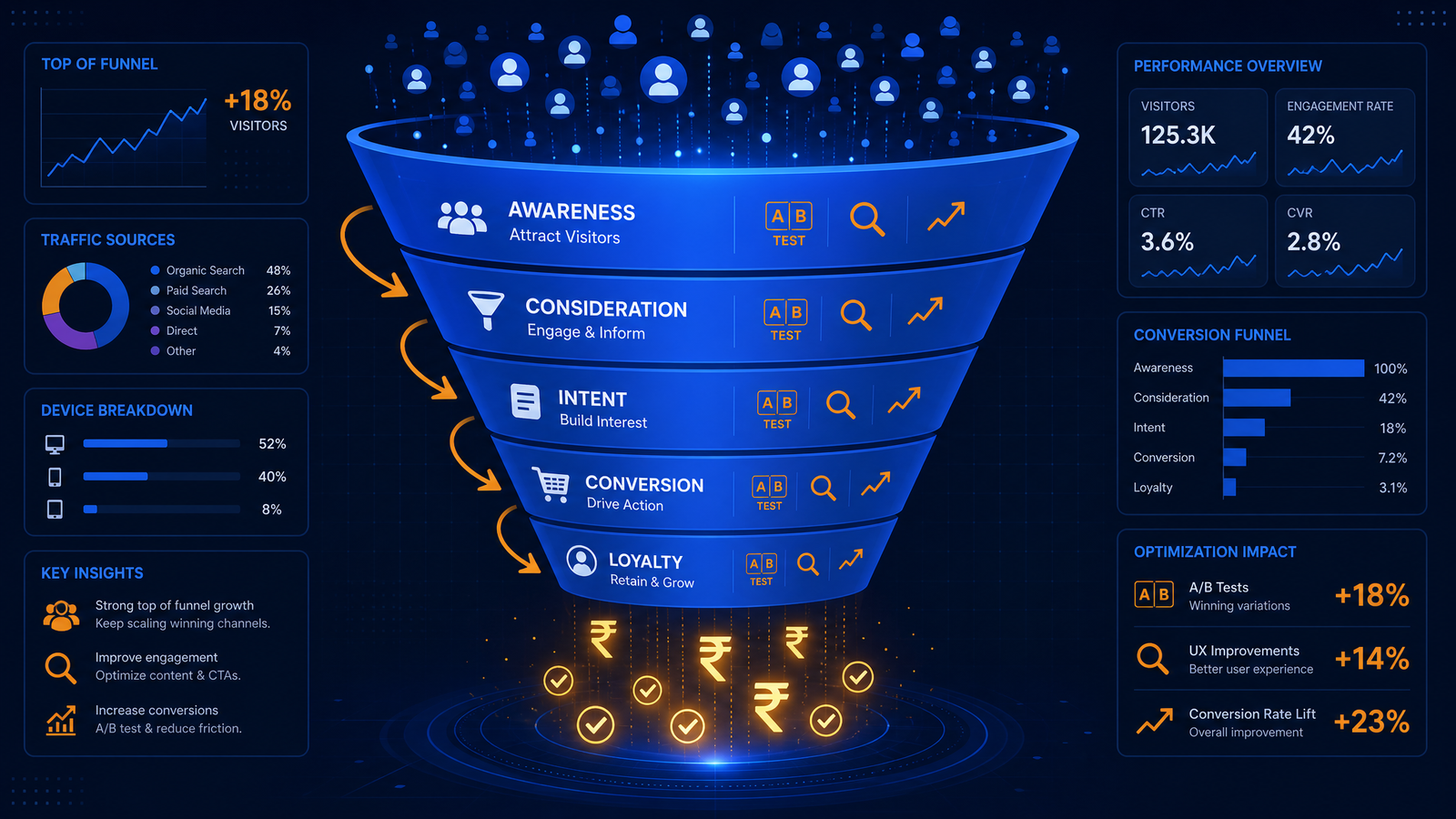
Imagine this: you're spending ₹1,00,000 a month on ads. Google Ads, Meta Ads, maybe some influencer collaborations. Your campaigns are driving 10,000 visitors to your website every month. But only 100 of them buy something. That's a 1% conversion rate.
Now imagine you improve your conversion rate to 3%. Same traffic, same ad spend — but now 300 people buy. Your revenue triples without spending an extra rupee on ads.
That's the power of Conversion Rate Optimization (CRO). It's the highest-ROI activity in digital marketing because you're optimising what you already have instead of spending more to get more. For a deeper dive, see lead generation tactics.
Most Indian businesses obsess over getting more traffic. They run more ads, post more content, chase more influencers. But if your website doesn't convert, all that traffic is wasted. It's like filling a bucket with a hole in the bottom — you can pour more water in, but it keeps leaking.
In this blog, we'll cover the complete CRO framework — how to analyse, hypothesise, test, and implement changes that turn more visitors into customers.
Current Conversion Rate Benchmarks for India
Before you start optimising, you need to know where you stand. For a deeper dive, see why your website needs to be mobile-friendly: google mo. What's a "good" conversion rate?
Ecommerce (overall): 1-2% in India is average. 2-3% is good. 3%+ is excellent.
Ecommerce (mobile): 0.5-1.5% (mobile converts worse than desktop for complex purchases)
SaaS/Software: 3-7% for free trials. 0.5-2% for paid subscriptions.
Service businesses (lead gen): 2-5% for contact form submissions. 1-3% for bookings.
Content/SaaS (email signup): 5-15% for gated content downloads. 2-5% for newsletter signups.
B2B: 1-3% for most lead generation pages.
Important: These are industry averages. Your specific conversion rate depends on your product, price point, traffic source, and industry.
The CRO goal: Don't compare yourself to industry averages. Compare yourself to your own past performance. Aim to improve by 10-20% month over month through systematic testing.
The CRO Framework: Analyze → Hypothesize → Test → Implement
CRO is not guessing. It's a scientific process. Here's the four-step framework we use at VidyaSaaS.
Step 1: Analyze
Before you change anything, understand what's happening on your website. Use these tools and methods:
Google Analytics 4:
- Look at pages with high traffic but low conversion — these are your biggest opportunities
- Check the user flow report — where are people dropping off?
- Analyse device breakdown — do mobile users convert at half the rate of desktop?
- Look at traffic source performance — do social media visitors convert worse than Google visitors?
Heatmaps and Session Recordings: Tools like Hotjar, Microsoft Clarity (free), or Crazy Egg show you:
- Where people click (be careful — they might click on things that aren't clickable)
- How far they scroll (do they even reach your CTA?)
- Where they hover or get confused
- Session recordings of real users navigating your site
The five-minute analysis: Open your website. Try to complete a purchase or submit a form. Time yourself. Note every friction point: slow loading, confusing form, unclear pricing, too many steps. Now imagine a user who doesn't know your brand doing this — they'll have less patience than you.
Step 2: Hypothesize
Based on your analysis, form hypotheses about what's wrong and what would fix it.
Good hypothesis structure: "We believe that [changing X to Y] will result in [Z% improvement] because [reason]."
- "We believe that reducing the form from 8 fields to 4 will increase form completions by 30% because shorter forms reduce friction."
- "We believe that adding customer reviews above the fold will increase conversion by 15% because social proof reduces purchase anxiety."
- "We believe that changing the CTA from 'Submit' to 'Get My Free Quote' will increase clicks by 25% because it's more specific and benefit-driven."
Step 3: Test
Implement the change and test it against the original.
A/B testing basics:
- Show Version A (original) to 50% of visitors and Version B (change) to 50%
- Run the test until you have statistical significance (at least 100 conversions per variation)
- Test one change at a time (otherwise you won't know what caused the improvement)
Testing tools:
- Google Optimize (free, integrates with GA4)
- VWO (paid, more features)
- Optimizely (enterprise)
- Simple manual testing (change page, track for 2 weeks, compare to previous 2 weeks)
Step 4: Implement
If the test shows a statistically significant improvement, implement the change permanently.
If the test is inconclusive (no clear winner), learn from it and form a new hypothesis. A "failed" test is NOT a failure — it's data. You learned that your hypothesis was wrong, which is valuable information.
Repeat the cycle. CRO is never "done." Every change you make reveals new opportunities to optimise further.
Landing Page Optimization
Landing pages are where most CRO efforts should focus because they're the entry point for your paid traffic.
Headline and Subheadline
Your headline is the first thing a visitor reads. It has 3 seconds to convince them to stay.
Bad headline: "Welcome to Our Website" Good headline: "Get 50% More Leads With Our Digital Marketing Services" Better headline: "Bhopal's Top Digital Marketing Agency — Average Client ROI of 5x in 90 Days"
Headline formula: [Promise of Specific Benefit] + [Timeframe or Proof] + [Credibility Signal]
Subheadline formula: Expand on the headline. Explain how you deliver the promise.
Above the Fold Content
Everything visible without scrolling needs to answer three questions:
- What is this? (clear value proposition)
- Why should I care? (benefit to me)
- What should I do? (clear next step)
The 3-second test: Show your landing page to someone for 3 seconds, then hide it. Ask them what your business does. If they can't answer, your above-the-fold content needs work.
Trust Signals
Place these near your CTA:
- Customer logos (well-known brands you've worked with)
- Review excerpts or star ratings
- Numbers ("50,000+ customers", "₹50M+ revenue generated")
- Security badges (SSL, payment protection)
- Certification logos
- Media mentions ("Featured in [publication]")
Visual Hierarchy
Guide the visitor's eye toward your CTA:
- Largest element: Headline
- Second largest: Hero image or video (showing product/service in action)
- Third: Key benefits (3-5 bullet points with icons)
- Fourth: CTA button (contrasting color, benefit-driven text)
- Fifth: Trust signals
Removing Distractions
Every link, navigation option, and image that doesn't support your primary goal is a distraction. For landing pages:
- Remove main navigation (keep them focused)
- Remove sidebar content
- Remove footer links (keep copyright only)
- Remove social media links (you don't want them leaving)
- Remove multiple CTAs (one primary action only)
Form Optimization
Forms are where many conversions die. A long, complicated form can kill 70-80% of your potential leads.
The Form Friction Problem
Every additional form field reduces conversion rate. Studies show:
- 4 fields: highest conversion rate
- 6 fields: 30% fewer conversions
- 8 fields: 50% fewer conversions
- 12+ fields: 80% fewer conversions
What you actually need vs what you want:
- Need: Name, Phone/Email
- Want: Address, Age, Company Size, Industry, Budget, How did you hear about us
Keep only what's essential for the initial contact. You can collect more information later in the sales process.
Form Design Best Practices
- Single column (multi-column forms confuse the eye)
- Clear labels above fields (not placeholder text — it disappears when they type)
- Error messages inline (not at the top after submission)
- Smart defaults (auto-detect country/state from IP)
- Progress bar for multi-step forms
- Autofill support (let browsers fill in saved information)
- Submit button text is benefit-driven ("Get My Free Quote" > "Submit")
- Privacy reassurance ("We'll never share your information")
Multi-Step Forms
For longer forms, break them into steps. A 10-field form split into 3 steps converts better than one long form. Why? Each step feels like progress, and users have already invested time so they're less likely to abandon.
Example: Step 1: Your Information (3 fields) → Step 2: Project Details (4 fields) → Step 3: Submit
CTA Optimization
Your Call-to-Action is the moment of truth. Everything on the page leads to this button. Get it wrong, and nothing else matters.
CTA Button Design
- Color: High contrast from page background. Primary blue #3B5AFF or accent orange #F59E0B works well against dark backgrounds.
- Size: Large enough to be obvious, not so large it's garish. Minimum 48px height on mobile.
- Whitespace: Plenty of space around the button. Don't crowd it.
- Shape: Rounded corners (studies show they perform better than sharp corners).
CTA Text
Bad CTAs: "Submit", "Click Here", "Learn More", "Send"
Good CTAs: "Get My Free Quote", "Start My 14-Day Trial", "Book My Free Consultation", "Download the Guide"
CRA formula: [Action Verb] + [My/Your] + [Specific Benefit]
The "My/Your" makes it personal. "Get My Free Quote" feels different from "Get Quote" because the "My" makes it about them.
CTA Placement
- Primary CTA: Above the fold (visible without scrolling)
- Secondary CTA: After key benefits section
- Sticky CTA: Mobile-only (fixed at bottom of screen)
- Exit-intent CTA: Appears when user is about to leave
Trust Signals That Boost Conversions
Trust is the biggest barrier to online conversion. Your visitors don't know you, haven't experienced your service, and are worried about making a bad choice. Trust signals reduce that anxiety.
Social Proof Types
- Customer reviews and ratings: Show real Google reviews or product ratings. Include the name and photo when possible.
- Testimonial carousel: 3-5 customer quotes with photos and designations. Specific results ("Increased their sales by 300%") beat generic praise ("Great service!").
- Case studies: Detailed stories of how you helped a customer. Include before/after numbers.
- Logos: Well-known brands you've worked with. Even 3-4 logos build credibility.
- User count: "2,000+ happy customers" or "50,000+ orders delivered."
- Real-time notifications: "X people are viewing this right now" or "Y people bought this today."
Authority Signals
- Industry awards and recognition
- Media mentions and press features
- Certifications and partnerships
- Author credentials (for content/consulting)
- Years in business
Security Signals
- SSL certificate (padlock icon in address bar — non-negotiable)
- Payment security badges (Visa Secure, Mastercard SecureCode)
- Secure checkout label
- Money-back guarantee badge
- Clear return/refund policy
Mobile CRO: The India-Specific Challenge
Over 70% of Indian web traffic is mobile. If your mobile experience is bad, you're losing most of your potential customers.
Common Mobile Conversion Killers
- Slow loading: 53% of mobile users abandon a site that takes over 3 seconds to load
- Pinch-to-zoom forms: Tiny form fields that require zooming
- Fat finger problems: Buttons too close together
- Sloooow checkout: 8-step checkout on a 6-inch screen
- Hidden menus: Navigation that requires hunting
- Interstitial popups: Full-screen ads that cover content
Mobile CRO Checklist
- Tap targets: Minimum 48x48 pixels with adequate spacing
- Thumb zone: Place primary CTAs in the bottom third of the screen (where thumbs naturally rest)
- One column: Never use multi-column on mobile
- Auto-detect: Pre-fill city and state from browser geolocation
- Click-to-call: Phone numbers should be clickable links
- Sticky CTA: Cart button or quote button stays visible while scrolling
- Simplified navigation: Hamburger menu with 5-7 items max
- Accelerated Mobile Pages (AMP): For content-heavy pages
- GDPR consent: Shouldn't cover the entire screen
- Font size: Minimum 16px to prevent iOS auto-zoom
Small Changes That Created Big Impact
Real examples from the VidyaSaaS team and industry case studies.
Change 1: CTA button color changed from green to orange Result: 21% increase in click-through rate Why: Orange created more contrast against the blue-themed page
Change 2: Removed navigation menu from landing page Result: 32% increase in form submissions Why: Visitors couldn't wander away from the conversion path
Change 3: Added customer logos above the fold Result: 18% increase in conversion rate Why: Social proof reduced trust barrier early
Change 4: Reduced form from 8 fields to 4 Result: 47% increase in form completions Why: Less friction = more completions (even though lead quality was slightly lower)
Change 5: Added a countdown timer to a promotional offer Result: 28% increase in conversions Why: Scarcity and urgency triggered action
Change 6: Switched from "Submit" to "Get My Free Analysis" Result: 33% increase in button clicks Why: Specificity and benefit-driven language outperformed generic action words
Change 7: Added phone number in header Result: 15% increase in overall conversions (web form + phone calls) Why: Some people prefer calling over filling forms
Change 8: Changed headline from "Digital Marketing Agency" to "Grow Your Business With Data-Driven Marketing" Result: 24% increase in time on page Why: Benefit-focused headline engaged visitors longer
Tools for CRO
You don't need expensive enterprise tools to start CRO. Here are tools for every budget:
Free:
- Google Analytics 4 — traffic and conversion analytics
- Google Search Console — understand how users find you
- Microsoft Clarity — heatmaps, session recordings (completely free)
- Google Optimize — A/B testing (being sunset, but still works)
- Hotjar — limited free tier for heatmaps
Paid (₹5,000-50,000/year):
- Hotjar (paid) — unlimited heatmaps and recordings
- VWO — full CRO platform with testing
- Crazy Egg — heatmaps and A/B testing
- Unbounce — landing page builder with built-in testing
- Optimizely — enterprise testing platform
Common CRO Mistakes
Testing too early: You need at least 1,000 visitors per variation for meaningful A/B tests. Testing with 200 visitors will give you false confidence.
Testing too many things at once: Change one element per test. If you change headline, image, and CTA in one test, you won't know which change caused the result.
Ending tests too early: The "peeking problem" — you see an early result and declare victory. Wait for statistical significance (95% confidence minimum).
Ignoring mobile: If 70% of your traffic is mobile, test mobile variations separately. What works on desktop may flop on mobile.
Optimising the wrong page: Don't optimise your About page. Optimise your product page, checkout, and landing pages — pages where conversion actually happens.
Copying competitors: Your competitor's successful test might fail for you. Your audience, traffic sources, and brand trust are different. Test for YOUR users.
Forgetting the post-conversion experience: A great CRO that gets people to sign up doesn't matter if your onboarding is terrible and they cancel immediately.
📚 Related Articles You Might Like:
Conclusion
CRO is not about magic tricks or guessing games. It's a systematic process of understanding your users, forming hypotheses, testing changes, and implementing what works. Every test — even "failed" ones — teaches you something about your audience.
The beauty of CRO is that improvements compound. A 10% improvement this month, another 10% next month, and another after that. Over a year, that's not 30% — it's a 33% improvement because each gain builds on the previous one.
Start with your biggest leak. Analyse your checkout flow, your landing pages, or your forms. Find one friction point, fix it, measure the result. Then find the next one.
Need help converting more of your website visitors? VidyaSaaS offers CRO and web design services that help Indian businesses turn traffic into revenue. From full conversion audits to landing page design and A/B testing, our team can help you get more from every visitor. Get in touch at info@vidyasaas.com or call +91 97542 70102.
Want Results Like This?
Get a free digital marketing audit and custom growth plan for your business.
Get Free AuditVidyaSaaS Team
Super AdministratorPart of the VidyaSaaS team — a group of digital marketing strategists, content specialists, and growth experts helping businesses across India achieve measurable results through data-driven marketing.
More about our teamRelated Articles
Handpicked content to help you grow your business

Digital Marketing for Noida Startups: From Zero to Visible in 90 Days
A practical 90-day digital marketing roadmap for Noida startups to build online visibility, attract...

Jaipur Business Guide: Traditional Markets Meet Digital Growth
How Jaipur businesses from gems to hospitality can blend traditional strengths with modern digital m...

Digital Marketing in Chandigarh: The Tricity Growth Playbook
A comprehensive digital marketing playbook for Chandigarh businesses targeting the Tricity area — Pa...
Ready to Grow Your Business?
Let's discuss how we can create a data-driven digital marketing strategy tailored to your goals.