How to Create a Social Media Content Calendar That Actually Works
Learn how to create a social media content calendar for your Indian business. Content pillars, batching, scheduling tools, festival planning, and real templates.
VidyaSaaS Team
Super Administrator
Introduction
Let me ask you a question that gets at the heart of why most social media strategies fail.
What are you posting tomorrow? If you don't have an answer, you're already behind.
Most Indian businesses start their social media journey with enthusiasm. They post consistently for two weeks. Then life happens. Client meetings. Operational fires. Family obligations. And before you know it, you're scrambling at 11 PM to find something — anything — to post. You end up sharing a random quote graphic or a low-quality photo, and you wonder why nobody engages. For more on this, see Instagram strategy guide.
A content calendar solves this. Not by making you post more, but by making your posting intentional. It turns social media from a daily panic into a planned, strategic activity that supports your business goals.
This isn't about filling a calendar with generic content. It's about creating a system that ensures every post serves a purpose, aligns with your brand, and moves your business forward. I've built content calendars for dozens of Indian businesses across industries. Here's exactly how to do it.
Why You Need a Content Calendar
Think of a content calendar like a meal plan. Without one, you eat whatever's available — which is usually junk. With a plan, you eat what your body actually needs. For more on this, see content marketing approach.
Same with content. Without a calendar, you post reactively. You share whatever comes to mind, whatever your competitor posted, or whatever viral trend you can half-heartedly participate in. With a calendar, every post has a job. It's either building awareness, educating your audience, driving engagement, or generating leads.
A content calendar also saves time. When you batch-create content, you reduce the decision fatigue that comes with daily posting. You make all your creative decisions in one focused session, then execute throughout the week. Creatives who batch their content report 40-60% less time spent on social media.
And here's the biggest benefit — consistency. A calendar keeps you showing up even when you don't feel like it. And on social media, consistency is more important than individual post quality. A steady stream of decent content outperforms occasional bursts of brilliance. For more on this, see publishing frequency guide.
How to Plan Monthly and Quarterly
Start with Your Business Goals
Before you plan a single post, ask yourself: what is this content supposed to achieve? Common goals for Indian businesses:
- Brand awareness (getting your name out there)
- Lead generation (getting inquiries and bookings)
- Community building (engaging existing customers)
- Thought leadership (establishing expertise)
- Product launches (announcing new offerings)
Different goals need different content. A lead generation goal means more conversion-focused posts with clear CTAs. A brand awareness goal means more shareable, educational content. Be clear about what you're trying to achieve this month or quarter.
Quarterly Planning
Every three months, sit down and map out:
- Business priorities — What's happening in your business? New product? Festival season? Slow period? Your content should reflect your business calendar.
- Industry events — What conferences, events, or trends are happening in your industry? Piggyback on relevant conversations.
- Content themes — Pick 2-3 overarching themes for the quarter. For example, Q4 for an agency could be "Year-end planning for 2027" and "Case studies from successful campaigns."
- Resource planning — How many posts can you realistically create? Based on your bandwidth, plan your content volume.
Monthly Planning
Break the quarterly plan into monthly buckets:
- Review last month's data — What worked? What didn't? Double down on what's working.
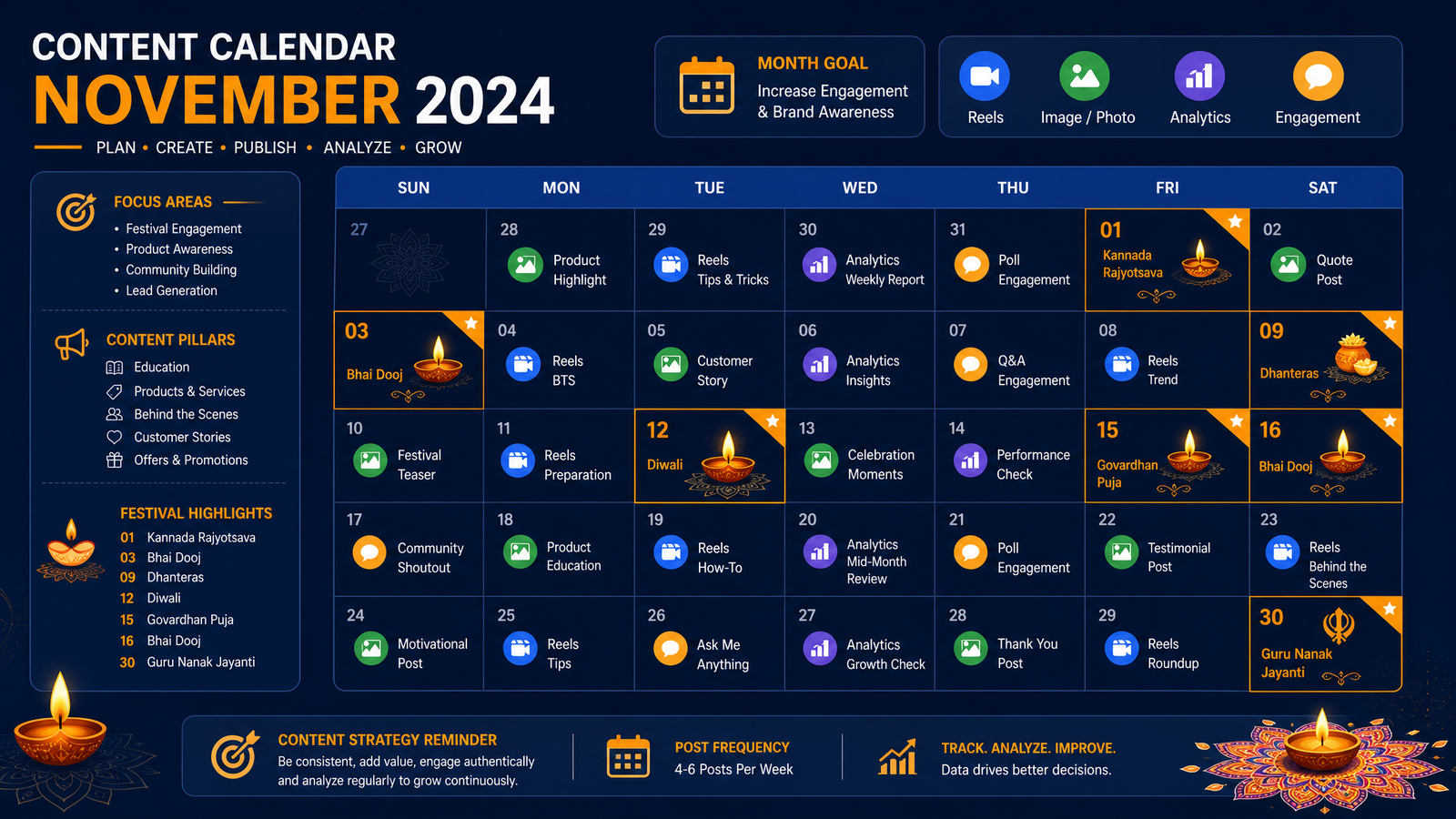
- Map the month's events — Indian festivals, national holidays, industry days (Digital Marketing Day, Small Business Day, etc.)
- Plan campaigns — Any focused campaigns? A Diwali promotion? A new service launch?
- Allocate content mix — Decide ratios: 40% educational, 30% entertaining, 20% promotional, 10% engagement
Weekly Planning
This is execution mode. Based on your monthly plan, assign specific posts to specific days. Time-sensitive content (event announcements, real-time trends) gets slotted in. Evergreen content fills the gaps.
Content Pillars: The Foundation of Your Calendar
Content pillars are the core topics your brand will consistently create content around. They ensure variety while maintaining focus.
For a digital marketing agency like VidyaSaaS, content pillars might be:
Pillar 1: Education — "How to run Google Ads for your business" or "SEO checklist for Indian websites." These establish expertise and provide value. They're the posts people save and share.
Pillar 2: Social Proof — Case studies, client testimonials, results. "We helped a Bhopal salon increase bookings by 200%." These build trust and credibility.
Pillar 3: Culture — Behind-the-scenes, team spotlights, office moments. "Our team celebrating Diwali at the office." These humanise the brand.
Pillar 4: Industry Commentary — Your take on industry news and trends. "Here's what Google's latest update means for your website." These position you as a thought leader.
Pillar 5: Engagement — Polls, questions, interactive content. "What's your biggest marketing challenge?" These drive conversations.
Every post you create should fit under one of these pillars. If a post doesn't serve a pillar, it probably doesn't need to exist.
The Content Mix: Balancing Different Types
Your content shouldn't be all one thing. A feed full of promotional posts will lose followers. A feed full of educational content won't generate leads. The right mix keeps your audience engaged while moving them through your funnel.
The 4-3-2-1 Rule
A simple framework for content mix:
4 Educational Posts: Tips, how-tos, checklists, industry insights. These build authority and get saved and shared.
3 Entertaining or Inspiring Posts: Relatable content, behind-the-scenes, humour (when appropriate), motivational stories. These build connection.
2 Promotional Posts: Direct offers, product showcases, testimonials, limited-time deals. These drive action.
1 Engagement Post: Polls, questions, fill-in-the-blanks, contests. These drive comments and interaction.
This isn't rigid — adjust based on your platform and audience. But as a starting point, it ensures your content isn't one-dimensional.
Platform-Specific Adjustments
Instagram: Lean more entertaining and educational. Promotional content should be subtle — Stories and Reels with soft-sell approaches.
Facebook: More educational and community-focused. Longer-form content works. Promotional posts in groups can work well.
LinkedIn: Heavy on educational and thought leadership. Promotional content should be case-study based. Entertainment should be professional and insightful.
YouTube: Almost entirely educational. Promotional content goes in video descriptions, not the video itself.
Tools for Scheduling and Management
You don't need expensive tools to manage a content calendar. Here's what works at different stages:
Free Tools
Google Sheets or Excel: The simplest content calendar. Create columns for Date, Platform, Content Pillar, Copy, Assets, Status, and Results. It's free, shareable, and flexible.
Google Calendar: Schedule posts as time-blocked events. Share with your team. Simple visual overview of the month.
Meta Business Suite: Free scheduling for Facebook and Instagram. Basic but functional. You can schedule posts, stories, and reels up to 30 days in advance.
Paid Tools (When You're Ready)
Later: Instagram-focused with a visual calendar. Good for planning your feed aesthetic. Starts at around ₹1,500/month.
Buffer: Simple, reliable scheduling across multiple platforms. Good for small teams. Starts at around ₹1,800/month.
Hootsuite: More advanced analytics and team collaboration. Starts at around ₹2,500/month.
Canva Pro: Not a scheduler, but with Canva Pro you can design content and schedule directly to social platforms. Great for small teams doing both design and scheduling.
Pick one tool and master it. Don't switch tools every month chasing the perfect solution.
How to Batch-Create Content
Batching is the single biggest time-saver in content creation. Instead of creating one post at a time, you create multiple pieces of content in one focused session.
The Batching Process
Step 1: Plan the batch. From your content calendar, pick 7-14 days worth of content. List every post you need — topic, format, platform, and caption.
Step 2: Write all captions. Open a document. Write all captions for the batch in one sitting. This takes advantage of flow state — once you're in writing mode, it's easier to keep going.
Step 3: Create all visuals. Design Reels, graphics, or shoot videos for all posts. If you're filming, set up once and record all video content. If you're designing, use templates to work faster.
Step 4: Schedule everything. Upload all content to your scheduling tool. Set dates and times. Done.
Tips for Efficient Batching
- Use templates. Design templates mean you don't start from scratch every time. Create templates for Instagram posts, LinkedIn headers, Reels covers, and Stories.
- Repurpose content. One YouTube video becomes 5 social posts. One blog becomes 3 LinkedIn posts. One client case study becomes content across all platforms.
- Schedule specific days. Block 3-4 hours every week or two for content creation on your calendar. Treat it like a client meeting — non-negotiable.
- Create content libraries. Save quotes, statistics, images, and ideas that you can pull from when inspiration is low.
Seasonal Content Planning for India
India has a rich calendar of festivals, events, and seasonal moments. Planning content around these makes your brand feel relevant and culturally connected.
Major Indian Festivals
Diwali (Oct-Nov): Gift guides, festive offers, "shop local" messages, Diwali greetings from the team. Creative idea: "Marketing lessons from Diwali" — draws parallel between festive rituals and business strategies.
Holi (March): Colour-themed creative, "fresh start" messaging, special offers. Creative idea: "Our clients are painting the town red — check out these results."
Dussehra (Oct): "Good over evil" narratives — how your business helps customers overcome challenges.
Eid (variable): Special offers for Eid shopping, inclusivity messaging.
Pongal/Makar Sankranti (Jan): Regional celebrations — great for connecting with South Indian audiences.
**Ganesh Chaturthi (Aug-Sept):_ Mumbai and Pune businesses — massive opportunity for local relevance.
National Events
Republic Day (Jan 26): Patriotism-themed content, special offers for the day. "Building a digitally independent India."
Independence Day (Aug 15): Content about Indian entrepreneurship, supporting local, freedom-themed narratives.
Gandhi Jayanti (Oct 2): Content about simplicity, sustainability, or ethical business practices.
Industry-Specific Days
National Small Business Day: Content celebrating small businesses you've worked with.
Digital Marketing Day: Industry insights, behind-the-scenes of your agency.
National SEO Day: SEO tips, case studies.
Seasonal Themes
Summer (April-June): "Beat the heat" offers, summer sale messaging, vacation-ready content.
Monsoon (July-Sept): "Make the most of rainy days" content — productivity tips, indoor activities, cosy products.
Winter (Nov-Feb): Year-end planning, goal setting for new year, winter collection or offers.
Wedding Season (Oct-Dec, Feb-March): Must-plan for wedding-related businesses (salons, jewellery, catering, photography, apparel).
Planning Template
For each month, list:
- Festivals and events
- Seasonal themes
- Your business activities (launches, promotions, quiet periods)
- Content opportunities
Slot your content pillars around these events. Don't force it — only create relevant content if it naturally fits your brand.
Template Ideas for Your Content Calendar
Here's a practical template structure you can use:
Weekly Content Calendar Template
| Day | Platform | Pillar | Topic | Format | Status | |-----|----------|--------|-------|--------|--------| | Mon | Instagram | Education | 5 SEO mistakes | Carousel | Scheduled | | Tue | LinkedIn | Thought Leadership | Google update analysis | Text post | Draft | | Wed | Instagram | Engagement | Poll: which ad platform works best? | Stories poll | Ready | | Thu | Instagram | Social Proof | Client testimonial | Reel | Scheduled | | Fri | LinkedIn | Education | Checklist: website audit | Carousel doc | Draft | | Sat | Instagram | Culture | Weekend at office | Photo | Ideas |
Monthly Overview Template
Create a grid with columns for Week 1, 2, 3, 4. For each, note:
- Theme or campaign
- Key posts (type and topic)
- Affiliated campaigns
- Metrics to track
Measuring What Works
A content calendar isn't just about planning — it's about learning. Each month, review:
Top 5 Performing Posts: What do they have in common? Topic? Format? Platform? Day posted? Time?
Bottom 5 Posts: Why didn't they perform? What can you stop doing?
Engagement by Platform: Which platform is driving the most meaningful engagement? Adjust your calendar accordingly.
Conversion Tracking: Which content actually led to inquiries, bookings, or sales? This is harder to track but more important. Use UTM parameters and ask new customers how they found you.
Common Content Calendar Mistakes
Overplanning. A calendar that's filled too far in advance can't adapt to real-time opportunities. Leave 20-30% of slots open for reactive content.
Underplanning. No calendar at all means scrambling daily. Find the middle ground — plan your pillars and major campaigns, leave room for spontaneity.
Ignoring Platform Differences. Posting the same content everywhere with no adaptation. Each platform needs slightly different treatment.
No Repurposing Strategy. Creating unique content for every platform exhausts you. Plan for repurposing — create once, distribute with platform-specific tweaks.
Skipping the Review Process. Creating a calendar is useless if you never review performance. Schedule monthly reviews.
📚 Related Articles You Might Like:
Conclusion
A content calendar turns social media from a burden into a system. It gives you control over what you post, when you post, and why. It ensures you're not just filling space, but building a brand.
Start simple. Use a Google Sheet. Map out your content pillars. Plan one month at a time. Batch-create your content. Post consistently. Review what works. Adjust.
The businesses that win on social media aren't the ones with the most creative content. They're the ones who show up every day with a plan.
Need help building your social media strategy? At VidyaSaaS, we create comprehensive content calendars and social media strategies for Indian businesses. Check out our Social Media Marketing services or get in touch for a free consultation.
Want Results Like This?
Get a free digital marketing audit and custom growth plan for your business.
Get Free AuditVidyaSaaS Team
Super AdministratorPart of the VidyaSaaS team — a group of digital marketing strategists, content specialists, and growth experts helping businesses across India achieve measurable results through data-driven marketing.
More about our teamRelated Articles
Handpicked content to help you grow your business
Kolhapur Footwear to Film City: Social Media Marketing for Maharashtra Cultural and Industrial Hub
Kolhapur chappals are worn across India. Its film industry produces 30+ Marathi films yearly. But it...
Tirunelveli Temple to Tech: Social Media Marketing for Tamil Nadu Education and Industry Hub
Tirunelveli Nellaiappar Temple has stood for 1300 years. Its engineering colleges produce thousands...
Beyond Krishna's Land: Social Media Marketing for Mathura's Pilgrimage Economy, Sweet Shops & Handloom Industry
Mathura's pedas are legendary, its temples are world-famous, and its handloom has adorned deities fo...
Ready to Grow Your Business?
Let's discuss how we can create a data-driven digital marketing strategy tailored to your goals.