
7 Signs Your Business Website Needs a Redesign (And How to Do It Right)
Is your website costing you customers? Learn the 7 signs it's time for a redesign, plus a step-by-step process to revamp without losing SEO or traffic.
VidyaSaaS Team
Super Administrator
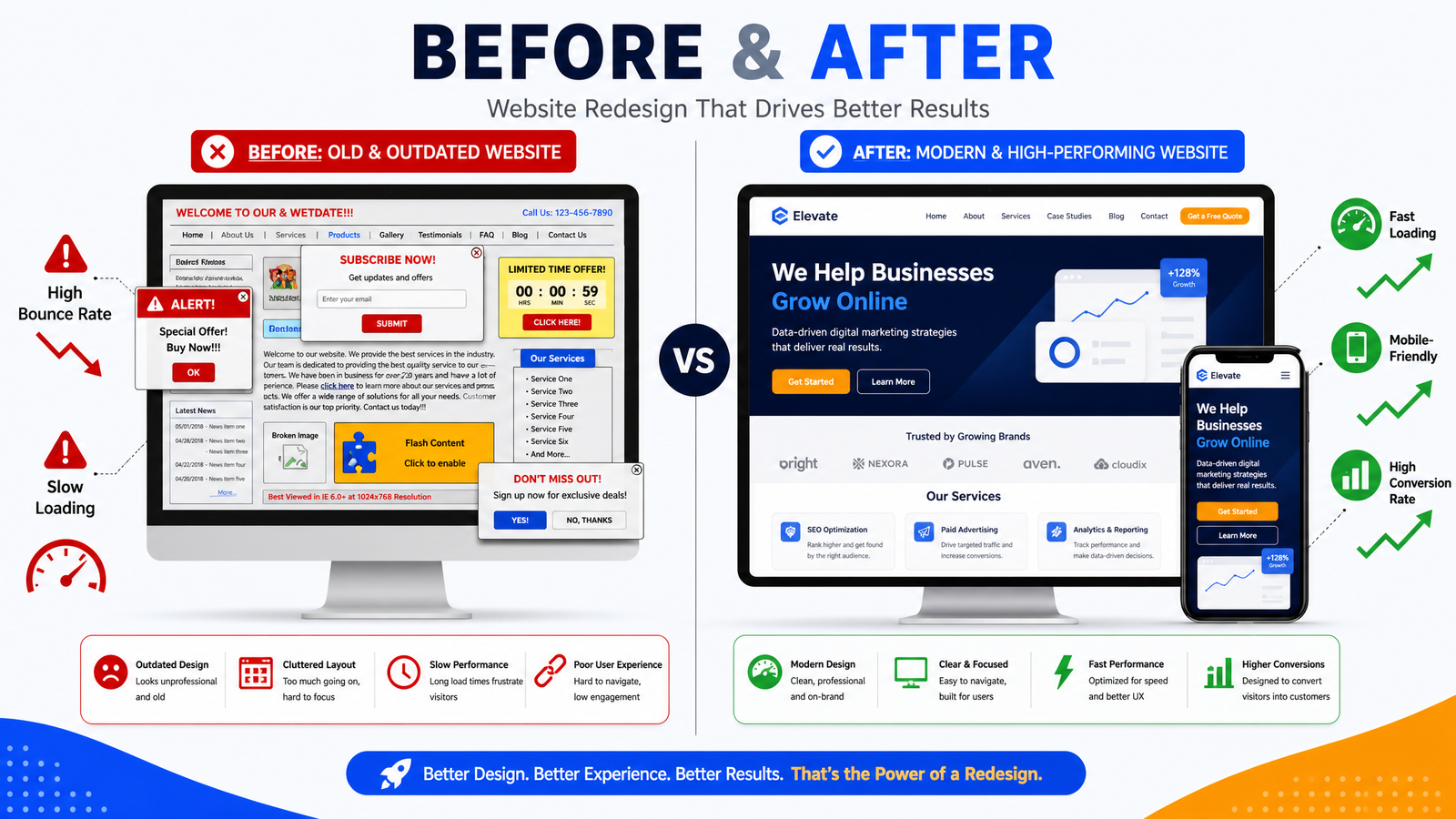
Meta Description: Is your website costing you customers? Learn the 7 signs it's time for a redesign, plus a step-by-step process to revamp without losing SEO or traffic.
Introduction
Here's a scenario we see all the time at VidyaSaaS. A business owner reaches out to us, frustrated. Their website traffic is flat. Their phone isn't ringing. Their competitors are growing while they're stuck.
And when we look at their website, the problem is obvious. It was built in 2018. The design is outdated. It takes six seconds to load on mobile. The contact form doesn't even work properly. Their branding has evolved, but the website hasn't changed a bit. For more on this, see website design guide.
The business owner knows something's wrong. They just can't put their finger on it. They've been living with their website for so long that they've stopped seeing it clearly.
This is website blindness. And it's costing you customers.
Most Indian business owners wait until their website is practically falling apart before they consider a redesign. By that time, they've already lost months or years of potential leads. The smarter approach is to recognise the warning signs early and act before the damage is done. For more on this, see mobile-friendly website tips.
In this guide, we'll walk through seven clear signs that your website needs a redesign. And more importantly, we'll show you how to do the redesign right — preserving your SEO, keeping your traffic, and coming out the other side with a site that actually works for your business.
Sign #1: Your Bounce Rate Keeps Going Up
Your bounce rate is the percentage of visitors who land on your website and leave without visiting another page. It's one of the clearest signals that something is wrong.
A healthy bounce rate depends on your industry, but here are rough benchmarks for Indian business websites:
- 40-55%: Normal for most content and service sites
- 55-70%: Concerning — something isn't clicking
- 70%+: Critical — you're losing most of your visitors
If your bounce rate has been creeping up over time, or if it's already in the danger zone, your website is failing at the first job: getting people to stay. For more on this, see CRO techniques.
Why Bounce Rate Increases Over Time
Websites age poorly. What looked modern three years ago looks dated today. Design trends shift. User expectations rise. A layout that felt fresh in 2020 now feels cluttered and confusing.
More importantly, your audience's behaviour changes. Mobile usage keeps growing. Attention spans keep shrinking. Your website needs to keep up, or visitors will leave.
How to Check Your Bounce Rate
Open Google Analytics. Go to Audience > Overview. Check the bounce rate for the last 30 days compared to the same period last year. If it's gone up by more than 5-10%, pay attention.
Segment by traffic source and device. A high bounce rate on mobile is especially concerning, since most of your traffic likely comes from phones.
What a Redesign Fixes
A well-executed redesign directly addresses the factors that cause high bounce rates: slow load times, confusing navigation, poor mobile experience, and unclear messaging. If you redesign with conversion in mind, your bounce rate should drop significantly within the first few months.
Sign #2: Your Conversion Rate Is Stagnant or Dropping
Traffic going up but leads staying flat? This is one of the most frustrating situations for a business owner. You're spending money on SEO, ads, and content, but the website isn't converting that investment into actual business.
This usually means your website has a conversion problem. Not a traffic problem.
Common Conversion Killers
Unclear value proposition. A visitor should understand what you do and why they should choose you within five seconds. If your homepage leads with a vague tagline or talks about your "mission" instead of your customer's problem, you're losing people.
Weak or confusing CTAs. "Learn More" is not a call to action. Neither is "Submit" or "Click Here." Your buttons should tell people exactly what they get: "Get Your Free Quote," "Book a Strategy Call," "Download the Guide."
No trust signals. Testimonials, case studies, client logos, certifications — these tell visitors you're legitimate. Without them, you're asking people to trust a stranger with their money.
Broken or complicated forms. If your contact form has ten fields and asks for too much personal information, people abandon it. If it doesn't even work (yes, we've seen this), you're losing leads without knowing it.
What a Redesign Fixes
A redesign lets you rebuild your site with conversion as the primary goal. Every page gets a clear purpose. CTAs get redesigned for maximum visibility. Forms get simplified. Trust signals get placed where they matter most.
The result: the same traffic generating more leads.
Sign #3: Your Website Looks Outdated
This one is subjective, but it matters more than you think. When someone lands on your website, they judge your credibility based on appearance within 50 milliseconds. That's not an exaggeration — it's backed by research from Google and the University of Florida.
An outdated website signals that your business might be outdated too. If your site looks like it was built five years ago, visitors assume your approach to your work is five years behind too.
What "Outdated" Looks Like
- Stock photography. Those generic images of smiling people in business suits shaking hands? They were overused in 2015. Today they scream "template website."
- Gradients and shadows. The early 2010s design trends that made everything look like a glossy button.
- **Flash. If your website still uses Flash, you're living in 2008. Flash hasn't been supported by browsers since 2020.
- Too much text. Walls of text with no images, no formatting, no breathing room.
- Small, non-descriptive buttons. Tiny "Click Here" buttons that don't inspire confidence.
- No mobile version. In 2026, this is the biggest signal of neglect.
The Cost of an Outdated Look
A study by Stanford found that 75% of users admit to making judgments about a company's credibility based on their website's design. In practical terms, this means: if your website looks old, people assume your business is less trustworthy and less capable.
For Indian consumers, who are already cautious about online businesses, an outdated design is often a dealbreaker.
What a Redesign Fixes
A modern design signals that you're current, professional, and invested in your business. Clean layouts, purposeful use of white space, contemporary typography, and authentic photography all contribute to a positive first impression.
Sign #4: Your Website Is Painfully Slow
Page speed isn't just a technical metric — it's a user experience killer and a ranking factor.
The Numbers Don't Lie
- 53% of mobile users abandon a site that takes longer than three seconds to load
- A one-second delay in page load time reduces conversions by 7%
- 40% of consumers will wait no more than three seconds before leaving a retail site
For an Indian business website getting 10,000 monthly visitors, a two-second delay could mean losing hundreds of potential leads every month.
How Fast Should Your Site Be?
Test your site on Google PageSpeed Insights. Here's what you should aim for:
| Metric | Target | |--------|--------| | First Contentful Paint | <2 seconds | | Largest Contentful Paint | <2.5 seconds | | Total Blocking Time | <200ms | | Cumulative Layout Shift | <0.1 |
If your site scores below 50 on mobile, it's time for a serious conversation about performance.
Why Websites Get Slow
The most common reasons: unoptimized images, too many plugins, heavy JavaScript, poor hosting, and lack of caching. A redesign gives you a chance to start fresh with performance as a non-negotiable requirement.
What a Redesign Fixes
A properly built modern website should load in under two seconds. This means optimized images (WebP format, properly sized), clean code, minimal JavaScript, good hosting, and effective caching. If your current site can't reach these numbers because of technical debt, a redesign is often faster and cheaper than trying to fix a broken foundation.
Sign #5: Your Website Isn't Mobile-Friendly
We covered mobile-first indexing extensively in our previous guide, but it bears repeating here. If your website isn't mobile-friendly in 2026, you're essentially invisible to 75% of your potential customers in India.
Quick Mobile Test
Open your website on your phone right now. Answer honestly:
- Can you read the text without zooming?
- Can you tap buttons without accidentally hitting the wrong one?
- Does the site load within three seconds?
- Can you navigate to key pages in two taps or less?
- Is the phone number tappable to call?
If you answered "no" to more than one of these, you need a redesign.
The Mobile Trap
Some websites technically work on mobile but provide a terrible experience. Text is tiny. Buttons overlap. Forms are impossible to fill. These sites pass the "it works on mobile" test but fail the "it works well on mobile" test.
Google's Core Web Vitals measure user experience, not just mobile compatibility. A redesign lets you build a genuinely mobile-first experience, not a desktop site that's been crammed into a phone screen.
What a Redesign Fixes
Every modern website built by professionals like VidyaSaaS is mobile-first by default. Responsive design, touch-friendly interfaces, mobile-optimized navigation, and fast loading on cellular networks. When you redesign, mobile isn't an afterthought — it's the starting point.
Sign #6: Your Website Is Hard to Update
If updating your website requires calling a developer every time you want to change a phone number, add a testimonial, or publish a blog post, you have a problem.
The Hidden Cost of a Static Site
When your website is hard to update, you stop updating it. That leads to:
- Outdated information. Your services page still lists last year's offerings. Your team page shows people who left the company. Your blog hasn't been updated in eight months.
- Lost SEO opportunities. Fresh content is one of the best ways to improve search rankings. If you can't easily publish new content, you're leaving rankings on the table.
- Missed conversions. Every testimonial you can't add, every case study you can't publish, every offer you can't promote — they're all lost opportunities to convert visitors.
What Easy Looks Like
A modern content management system (CMS) should let you:
- Edit any page's text and images without touching code
- Publish blog posts with a simple editor
- Add or update team members, testimonials, and case studies
- Change CTAs and offers across the site
- Update your phone number, address, and business hours
If your current website doesn't allow this, you're paying a hidden tax every time you need to make a change.
What a Redesign Fixes
A redesign lets you choose the right CMS for your needs. Whether it's WordPress, a custom solution, or a headless CMS, the goal is the same: you (or your team) should be able to update your website without developer involvement. This alone can save you lakhs of rupees in development fees over the life of your website.
Sign #7: Your Website Doesn't Reflect Your Current Brand
Businesses evolve. Your logo, colors, messaging, and positioning may have changed since you first launched your website. But if your website still shows the old brand, you're creating confusion.
Brand Disconnect Costs Trust
Imagine a potential client sees your new, modern logo on Instagram, clicks through to your website, and lands on a page that looks completely different. The colors don't match. The tone is different. The messaging talks about things you no longer do.
That visitor will leave. The inconsistency signals that you're either not paying attention or not professional enough to keep things consistent.
Signs of Brand Drift
- Your logo on your website is older than the one on your social media
- Your brand colors and fonts have changed, but the site hasn't
- Your messaging talks about services you don't offer anymore
- Your website says one thing about your positioning, but your sales team says another
- Your competitor analysis and value proposition have evolved, but the site is stuck in the past
What a Redesign Fixes
A redesign lets you align your entire digital presence. Consistent colors, fonts, messaging, and imagery across your website, social media, email, and marketing materials. Every touchpoint reinforces the same brand story.
The Redesign Process: How to Do It Right
Knowing that you need a redesign is one thing. Doing it without destroying your traffic, SEO, and revenue is another. Here's the process we follow at VidyaSaaS.
Phase 1: Audit (Week 1-2)
Before you touch a single line of code, understand what you have and what's working.
- Analytics deep dive: Which pages get the most traffic? Where do users drop off? What's the conversion path?
- SEO audit: What keywords are you ranking for? Which pages have backlinks? What's your current search traffic?
- Technical audit: Page speed, mobile-friendliness, security issues, broken links.
- Competitive analysis: What are your top 3 competitors doing well? What's missing from their sites?
- User feedback: Survey your customers. What do they like about your site? What frustrates them?
Phase 2: Strategy (Week 2-3)
Define what the new site needs to achieve.
- Goals: Specific, measurable targets. "Increase contact form submissions by 40%." Not "make it look better."
- Information architecture: Map out the new site structure. Which pages stay? Which go? What's new?
- Content plan: What content needs to be created, rewritten, or repurposed?
- Technical requirements: CMS choice, hosting, integrations, third-party tools.
Phase 3: Design (Week 3-5)
This is where the new site takes shape. But design should follow strategy, not lead it.
- Wireframes: Skeleton layouts showing structure, not visual design.
- Visual design: Based on your updated brand guidelines. Multiple rounds of refinement.
- Prototype: Clickable version of the site for internal testing and stakeholder review.
- Mobile-first: Every page is designed for mobile first, then expanded to desktop.
Crucial rule during redesign: Do not change URL structures unless absolutely necessary. If you must change URLs, set up 301 redirects from old URLs to new ones. This preserves your SEO equity.
Phase 4: Development (Week 4-8)
Building the actual site. This should follow the approved designs exactly.
- Frontend development: HTML, CSS, JavaScript — the visual layer.
- Backend development: CMS setup, functionality, integrations.
- Content migration: Moving content from the old site to the new one. This is where most problems occur. Do it carefully.
- Testing: Cross-browser testing, mobile testing, form testing, speed testing, SEO testing.
Phase 5: QA and Review (Week 7-9)
Don't skip this phase. A buggy launch damages credibility.
- Internal QA: The development team tests everything.
- Stakeholder review: You review the staging site and give feedback.
- User testing: Have a few non-technical users try the site. Watch where they get confused.
- SEO verification: Check that all redirects work, all pages are indexed, and no critical SEO elements were lost.
Phase 6: Launch (Week 9-10)
The big day.
- Pre-launch checklist: Final SEO check, backup old site, set up analytics, configure redirects.
- DNS switch: Point your domain to the new hosting.
- Post-launch monitoring: Watch analytics daily for the first week. Check for errors. Monitor traffic and conversion changes.
Phase 7: Post-Launch (Week 10+)
Your website is live. The work isn't done.
- Performance tracking: Compare KPIs against pre-launch benchmarks.
- Iteration: Based on real data, make improvements. Conversion rate optimization is an ongoing process.
- Content strategy: Keep publishing. A great site + no content = wasted potential.
Common Redesign Mistakes to Avoid
1. Redesigning for Aesthetics Instead of Performance
The most beautiful website in the world is worthless if it doesn't generate leads. Focus on conversion, not just looks.
2. Ignoring SEO
We've seen businesses lose 60% of their traffic after a redesign because they changed all their URLs without setting up redirects. SEO preservation should be a priority from day one.
3. Building Without Real Content
If you launch a site with Lorem Ipsum text and placeholder images, you're asking for trouble. Have real content ready before launch.
4. Forgetting Mobile Users
If your new site isn't tested thoroughly on real mobile devices, you're launching blind.
5. Skipping User Testing
You know your business too well to see your website with fresh eyes. Get real users to test it before launch.
6. Launching Everything at Once
Consider a phased launch. Launch the homepage and top service pages first, then add secondary pages. This lets you catch and fix issues without everything breaking at once.
Budget and Timeline Expectations for a Redesign
Let's be realistic about what a redesign costs and how long it takes.
Timeline
| Phase | Duration | |-------|----------| | Audit and Strategy | 1-3 weeks | | Design | 2-4 weeks | | Development | 3-6 weeks | | QA and Revisions | 1-3 weeks | | Launch | 1 week | | Total | 8-17 weeks |
Anyone promising to redesign your entire website in two weeks is either cutting corners or using a template with minimal customization.
Budget (₹)
| Type | Cost Range | Best For | |------|-----------|----------| | Template-based redesign | ₹30,000 – ₹80,000 | Simple brochure sites | | Custom redesign (5-10 pages) | ₹80,000 – ₹2,00,000 | Small businesses | | Custom redesign (10-25 pages) | ₹2,00,000 – ₹5,00,000 | Growing businesses | | Enterprise redesign | ₹5,00,000+ | Large sites with complex features |
These are ballpark figures. Actual costs depend on complexity, number of pages, custom features, and the agency you choose.
📚 Related Articles You Might Like:
Conclusion
Your website is never "done." It's a living asset that needs to evolve with your business, your customers, and the market. If any of the seven signs we discussed sound familiar, it's time to think seriously about a redesign.
The good news is that a well-executed redesign — done the right way, with the right process — can transform your website from a cost center into a revenue driver. Better traffic, higher conversions, and a brand that actually reflects who you are.
At VidyaSaaS, we've helped hundreds of Indian businesses redesign their websites. We've seen traffic double, leads triple, and businesses transform. The process works, but only if you commit to doing it right.
Is your website ready for a redesign? The team at VidyaSaaS offers a free website audit that will tell you exactly what's working, what's not, and what a redesign would cost. With over 2,000 websites built and a full-service team in Bhopal, we can handle your redesign from start to finish. Get your free website audit.
Want Results Like This?
Get a free digital marketing audit and custom growth plan for your business.
Get Free AuditVidyaSaaS Team
Super AdministratorPart of the VidyaSaaS team — a group of digital marketing strategists, content specialists, and growth experts helping businesses across India achieve measurable results through data-driven marketing.
More about our teamRelated Articles
Handpicked content to help you grow your business
Solapur Textile Town 2.0: Web Design and Digital Presence for Maharashtra Manufacturing Hub
Solapur towels and bed sheets supply hotels across India. Its textile mills run 24/7. But its websit...

Bhavnagar Port City Potential: Web Design and Digital Presence for Gujarat Diamond and Ship-Breaking Hub
Bhavnagar diamond polishers supply global markets. Alang ship-breakers recycle the world vessels. Bu...

Erode Turmeric to Textiles: Web Design That Sells for Tamil Nadu Agricultural Powerhouse
Erode turmeric sells in 40 countries. Its textile mills supply global brands. But most businesses he...
Ready to Grow Your Business?
Let's discuss how we can create a data-driven digital marketing strategy tailored to your goals.